Most people focus on brand or suction numbers—what actually matters is how the vacuum fits your home
Choosing a robot vacuum for your home starts with matching the machine to your floors, layout and lifestyle. “Powerful suction” sounds good, but a high-suction unit is useless if it can’t navigate cluttered rooms, handle pet hair, or recharge between sessions. Below is a practical way to decide what features will deliver real cleaning results for your specific house.
Decide what cleaning task is primary
Be specific: single-floor daily maintenance, pet hair, deep cleaning carpets, or a mop-and-vac combo for mixed floors. Your primary task narrows the feature set you need.
- Daily dust and crumbs on hard floors — prioritize quiet operation, scheduled runs, and a low-profile unit that reaches under furniture.
- Homes with pets — favor tangle-resistant brushes, strong suction, larger dustbin or auto-empty dock, and specialized filters for dander.
- Carpeted rooms requiring deeper pick-up — higher suction plus a multi-stage brushroll helps; look for dedicated carpet boost modes.
- Mixed tile and hardwood with occasional spills — choose a vacuum+mop with separate water control and washable mop pads.
Match features to your floor types and layout
Different floors and room shapes influence navigation and cleaning effectiveness.
- Hardwoods and low-pile rugs: simpler models with edge brushes and good suction work well.
- High-pile carpet or thick rugs: need stronger suction and a motorized brushroll—check clearance specs so it doesn’t get stuck.
- Many small rooms or multi-level homes: choose mapping (LIDAR or camera-based) and multi-floor memory so it won’t relearn each time.
- Lots of furniture or narrow gaps: a low-profile design and precise navigation help avoid frequent jams.
Navigation and smart features that reduce maintenance
Good navigation doesn’t just keep the vacuum moving—it cuts hands-on time. Key capabilities to consider:
- Mapping and zoned cleaning: lets you exclude areas, set no-go lines, and schedule by room.
- Obstacle detection and cliff sensors: reduce collisions and falls on stairs.
- Auto-empty dock: if you want true “set and forget” weekly cleaning, an auto-empty base reduces emptying intervals from daily to monthly.
- App control and voice assistant: useful for remote scheduling and spot cleaning; check if the app is reliable and how many home maps it supports.

Think about maintenance, consumables and lifetime costs
Upfront price is only part of ownership cost. Consider replacement filters, side brushes, main brushrolls, mop pads, and the frequency of emptying. Units with sealed HEPA-style filters and washable components often cost less to run. Also note battery replacement cycles and whether the manufacturer sells spare parts easily.
Noise, runtime and charging behavior
Runtime matters when you have large areas. Short run times force mid-clean recharges and partial cleaning. If you need overnight or quiet daytime cleaning, check the decibel rating and quiet modes. Models with fast recharge and good resume function that finish a job after recharging are preferable for bigger homes.
Pet owners: features that actually help with fur
For significant pet hair, prioritize:
- Brushless or anti-tangle brushrolls to reduce hair wrap.
- High suction with carpet-boosting mode.
- Larger dustbins or an auto-empty dock to avoid daily emptying.
- Washable filters and easily removable hair clogs—look for reviews that confirm performance over weeks, not just lab specs.
When a mop feature helps—and when it doesn’t
Robot mops are best for light maintenance on hard floors (dust, sticky footprints). Avoid expecting deep stain removal; mopping modules rarely replace a manual mop for dried spills. If you have both tile and carpet, a model that automatically lifts the mop or avoids carpets via mapped zones will save headaches.
Security and smart-home compatibility to check
If you plan to control devices centrally, confirm whether the vacuum supports your ecosystem (Alexa, Google Home, Apple HomeKit). Also review account privacy and whether the device stores maps in the cloud or locally—local map storage is preferable if you’re privacy-conscious.
Recommended robot vacuum when a single choice helps
If you want one well-rounded pick that fits most homes—mixed floors, pets, and a need for low maintenance—consider a top-ranked robot with mapping and auto-empty capability. For readers whose primary need is pet hair plus a mostly single-level layout, an auto-empty model saves the most time and keeps performance steady.
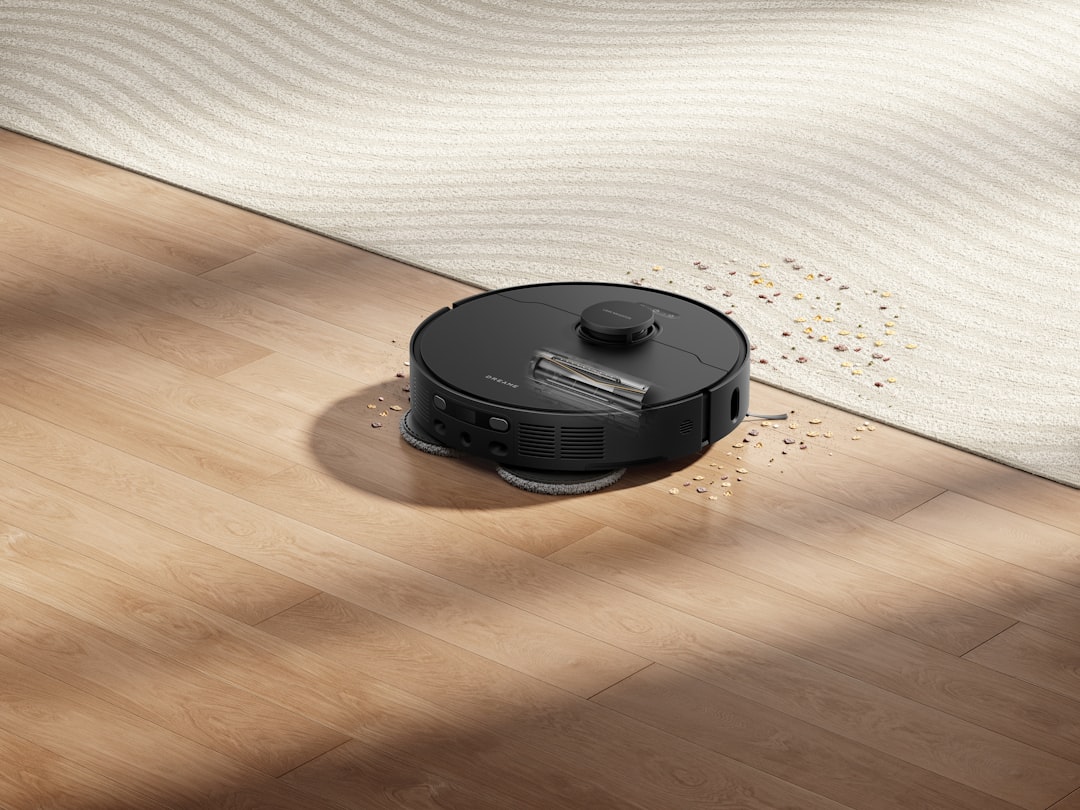
Why this model works
The recommended model pairs mapping navigation, strong suction and an auto-empty base—covering common pain points: pet hair, scheduled whole-home cleaning, and less frequent bin emptying. It’s a practical choice when you want consistent daily maintenance without constant intervention.
How to compare final candidates quickly (simple checklist)
- Confirm compatibility with your main floor type and whether it needs a mop mode.
- Check dustbin size and whether an auto-empty dock is available.
- Verify mapping, multi-floor memory, and no-go zoning in the app.
- Compare runtime vs. home square footage and whether it resumes after charging.
- Look at brush type and maintenance ease for pet hair or long fibers.
Buying timing and where to save or splurge
Splurge on mapping, multi-floor memory and an auto-empty dock if you want low-maintenance performance. Save on flashy onboard screens, extra sensors you won’t use, or high marketed suction numbers if the robot can’t navigate your rooms well. Look for seasonal deals, but confirm return policies and warranty terms before finalizing the purchase.
- Measure doorway widths and furniture clearance for low-profile models.
- List primary cleaning tasks (pets, carpets, spills) to prioritize features.
- Decide if you need auto-emptying to avoid daily maintenance.
- Check if the app supports multiple maps for split-level homes.
- Confirm availability and cost of replacement filters and brushes.
Match a robot vacuum’s strengths to your real needs: floors, pets, and how much hands-on work you tolerate. Prioritize mapping and a reliable emptying system for the least maintenance; otherwise choose a simpler model that fits your primary floor type.
Do I need mapping for a small apartment?
Not always. In a small, open apartment without lots of obstacles, a simpler model can do the job; mapping is most valuable in multi-room layouts and multi-floor homes.
Is a mop-and-vac robot better than separate devices?
For light maintenance on hard floors, a combo is convenient. For heavy mopping or persistent stains, a separate dedicated mop still performs better.
How often should I replace filters and brushes?
Filters typically need replacing every 3–6 months depending on use; brushes can last 6–12 months. Check manufacturer guidance and buy spares if you want uninterrupted performance.
Are robot vacuums good for pet hair?
Yes, models with anti-tangle brushrolls, strong suction and larger bins (or auto-empty docks) handle pet hair best—look for real-world reviews on hair performance.
Can robot vacuums damage floors?
Rarely—most have soft bumpers and sensors. Avoid models with abrasive wheels and confirm mop water-control settings to prevent over-wetting wood floors.
Internal resources that may help with related choices: how to improve your home Wi‑Fi for better remote control, smart home device basics if you’re integrating assistants, and guidance on choosing tech if you want help comparing specs across devices.